Switching Broadband Without Downtime in Singapore

Arrange and activate your new fibre line before you cancel the old one — if your Fibre Termination Point has a free port, both can run briefly so there is no gap. Check your contract for early-termination charges first, and return any provider equipment.
On this page10 sections · tap to jump
- 01One fibre network, many retailers
- 02The no-downtime method: overlap on a spare port
- 03When both ports are full
- 04NetLink Trust installation and activation costs
- 05Check your contract before you sign anything
- 06What happens on installation day
- 07Return the old equipment
- 08Moving in: an occupied or unreleased port
- 09Switching while moving home
- 10A simple switching checklist
The trick to switching home broadband without being cut off is simple once you know how Singapore’s fibre works: get the new service up before you cancel the old one. Because every home is served by the same NetLink Trust fibre network, your new provider can often activate its service on a spare port while your current line is still running — so you only terminate the old plan once the new one works. Get the order wrong, cancel too early, or miss an early-termination clause, and a smooth switch turns into days offline and a surprise bill.
Here is the whole process — the fibre setup, the one-off fees, the contract traps, and how to overlap the two services so there is no downtime.
One fibre network, many retailers
In Singapore you are not switching networks, only retailers. NetLink Trust “designs, builds, owns and operates the passive fibre network infrastructure of Singapore’s Next Generation Nationwide Broadband Network” and gives “open, wholesale access” to the ISPs — Singtel, StarHub, M1, SIMBA, ViewQwest, WhizComms and others — who sell you a plan on top of it. The physical fibre into your home does not change when you switch provider.
What matters inside your home is the Fibre Termination Point (FTP) — the small box where the fibre terminates, usually with two ports. Whether you can switch with no downtime comes down to one question: is there a free port?
The no-downtime method: overlap on a spare port
Both Singtel and GOMO describe the same safe sequence. Singtel’s advice is to “arrange your new fibre broadband installation before cancelling your current service”; where your home has a spare port, “your new broadband may be activated on another available fibre connection while your existing service remains active”, so you “terminate your old service once your new service is up.”
The steps:
- Sign up with the new provider and give your installation address so it can check port availability with NetLink Trust.
- Let them activate the new line on the spare port while the old one still runs.
- Test the new connection thoroughly.
- Only then cancel the old plan per its contract terms, and return the old equipment.
You can legitimately run two broadband services at once during the handover, “subject to address eligibility and sufficient available fibre ports” — but you “may be charged for both services during that period”, so keep the overlap short.
When both ports are full
If both ports on your FTP are already occupied, you have two options, and both cost time or money:
- Add a second FTP. “If both ports are occupied, an additional Fibre Termination Point may be needed… Additional charges and a longer setup time may apply.”
- Free up a port by terminating one existing service first — but this risks downtime, so confirm early-termination charges before cancelling.
There is a catch even after you cancel: “terminating your existing service may not release the port immediately. Your previous internet service provider needs to release it through NetLink Trust before it can be used.” Confirm the port-release and activation dates with both providers so there is no dead gap.
NetLink Trust installation and activation costs
Switching retailer on an existing, connected home is often free of fibre charges because the fibre point is already there. Fees appear when physical fibre work is needed. NetLink Trust’s residential tariffs (correct as of 1 April 2024, inclusive of GST) are:
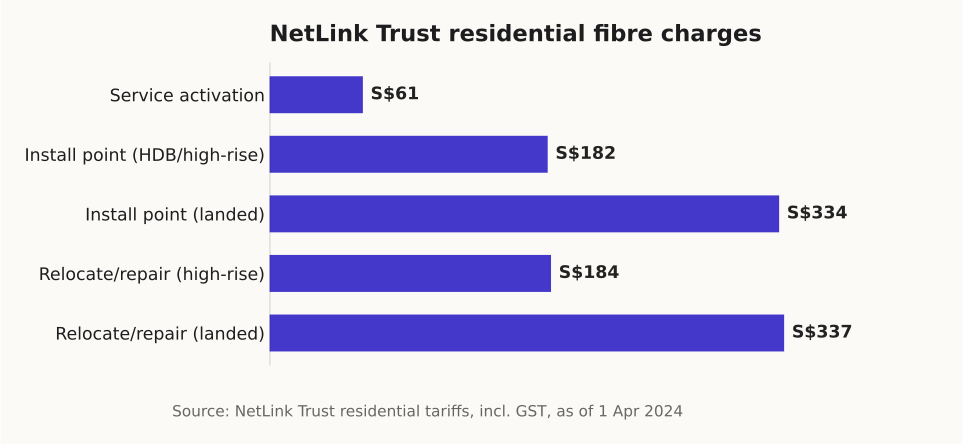
One-off NetLink Trust fees that can apply when fibre work is needed.
| NetLink Trust charge | HDB / high-rise | Landed |
|---|---|---|
| Install a new fibre point | S$182.03 | S$333.54 |
| Service activation | S$61.04 | S$61.04 |
| Relocate / repair / replace / remove | S$184.21 | S$336.81 |
| Fibre run beyond first 15 m | S$1.09 per extra 5 m | S$1.09 per extra 5 m |
So a service activation is S$61.04, and installing a brand-new point in a flat that has never had fibre is S$182.03 on top. Many ISP promotions absorb activation for new sign-ups — check whether yours does, because it is a line most people forget to compare.
Check your contract before you sign anything
The single biggest switching cost is usually your own old contract, not the new one. Broadband plans run on 12- or 24-month terms, and leaving early stacks up charges. Before you sign anything new, Singtel’s guide says to know four things: “your contract end date, any early termination or notice requirements, which equipment needs to be returned, and how and when that equipment should be returned.”
An early-termination bill typically combines the remaining monthly charges for the unexpired term, the NetLink Trust service activation charge (S$61.04) and an administrative fee — which is why cancelling a two-year plan a month in can run into several hundred dollars.
What happens on installation day
If new fibre work is needed, “NetLink Trust may first need to activate the fibre connection to your home” before your ISP installs its equipment. For the equipment install you generally need to be home: Singtel notes you “need to be present while our engineer installs and sets up your broadband equipment”, and to “have two power points available: one for the optical network equipment and another for your Wi-Fi router.”
NetLink Trust requires the “homeowner should be present during the installation process”, or you may “authorise a person aged 18 years and above to supervise.” Standard installation uses surface trunking; anything concealed needs your own contractor.
Return the old equipment
After the new service is confirmed working and the old plan is cancelled, return whatever belongs to the old provider — typically the router and the optical network terminal (ONT/ONR). Keep the return receipt: unreturned equipment is a common source of extra charges. Your own-bought router or mesh is yours to keep, and may work on the new line.
Moving in: an occupied or unreleased port
Move into a resale flat and you may find the fibre port still linked to the previous owner or tenant — an “Unreleased Fibre Issue”. You cannot fix this yourself: NetLink Trust “cannot process requests made directly by end-users”, so it “can only be resolved through a request submitted by your Internet Service Provider.” Sign up with an ISP, show proof of ownership or tenancy, and let them clear it with NetLink Trust.
Switching while moving home
Changing both your address and your provider is two jobs. A NetLink Trust relocation order moves a single fibre connection to the new premises, and “once the fibre connection at your new premises has been successfully established… the fibre connection at your existing premises will be automatically terminated on the same day.” You cannot keep both addresses live under one relocation order. If you are also porting your home phone number, allow “at least an additional three working days” for fibre activation before the number port can start.
A simple switching checklist
- Check your current contract: end date, early-termination charge, notice period, equipment to return.
- Sign up with the new ISP and have them confirm a free FTP port with NetLink Trust.
- Activate the new line while the old one still runs; test it.
- Cancel the old plan and return its equipment; confirm the port is released.
For choosing the plan itself, see our best broadband plans comparison and whether 1Gbps is enough for your home. If you are switching your mobile at the same time, here is how to keep your number, and whether bundling the two actually saves. Always confirm current fees and contract terms on each provider’s own page before you commit.
Sources
- NetLink Trust — Home fibre broadband installation (charges) — NetLink Trust (as of October 2026)
- NetLink Trust — Residential Connections FAQ — NetLink Trust (as of October 2026)
- NetLink Trust — Tariff for installation of Fibre Termination Point (1 Apr 2024) — NetLink Trust (as of October 2026)
- Singtel — How to switch broadband providers in Singapore — Singtel (as of October 2026)
- GOMO — Switch broadband before your contract ends — GOMO (Singtel) (as of October 2026)
- MDDI — response to PQ on porting of telephone numbers — Ministry of Digital Development and Information (as of October 2026)
- IMDA — Telecommunications Consumers — Infocomm Media Development Authority (as of October 2026)